
D2R Arcane Tracker – Holy Grail tracker for Diablo II: Resurrected
It reads your Diablo 2 Resurrected save files and records every unique, set item, rune and runeword you find, so you never have to type one in.
Version 0.5.0 for Windows 10 and later. Free and open source.
Holy Grail tracker features
Five pages, one for each part of the D2R grail hunt. Pick one to see it.
- Holy GrailChecks off every unique, set item, rune and runeword you find, straight from your save files.
- StatisticsSums up your grail progress, latest finds, closest set and the runes you still need.
- Run TrackerTimes your farming runs and adds each find to the run it dropped in.
- Runeword CalculatorShows which runewords you can make with the runes you have.
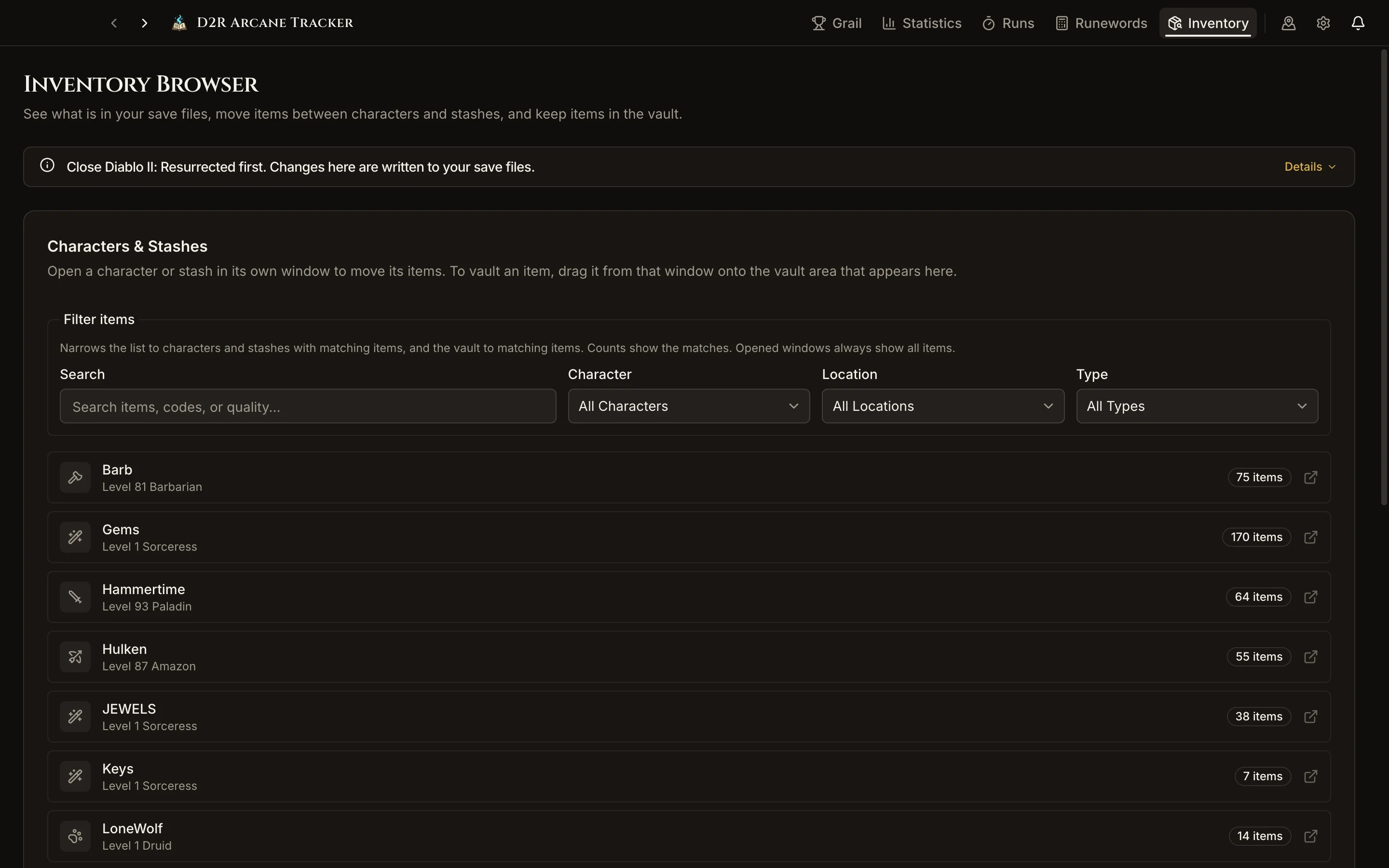
- Inventory BrowserOpens your characters and shared stashes outside the game and moves items between them.
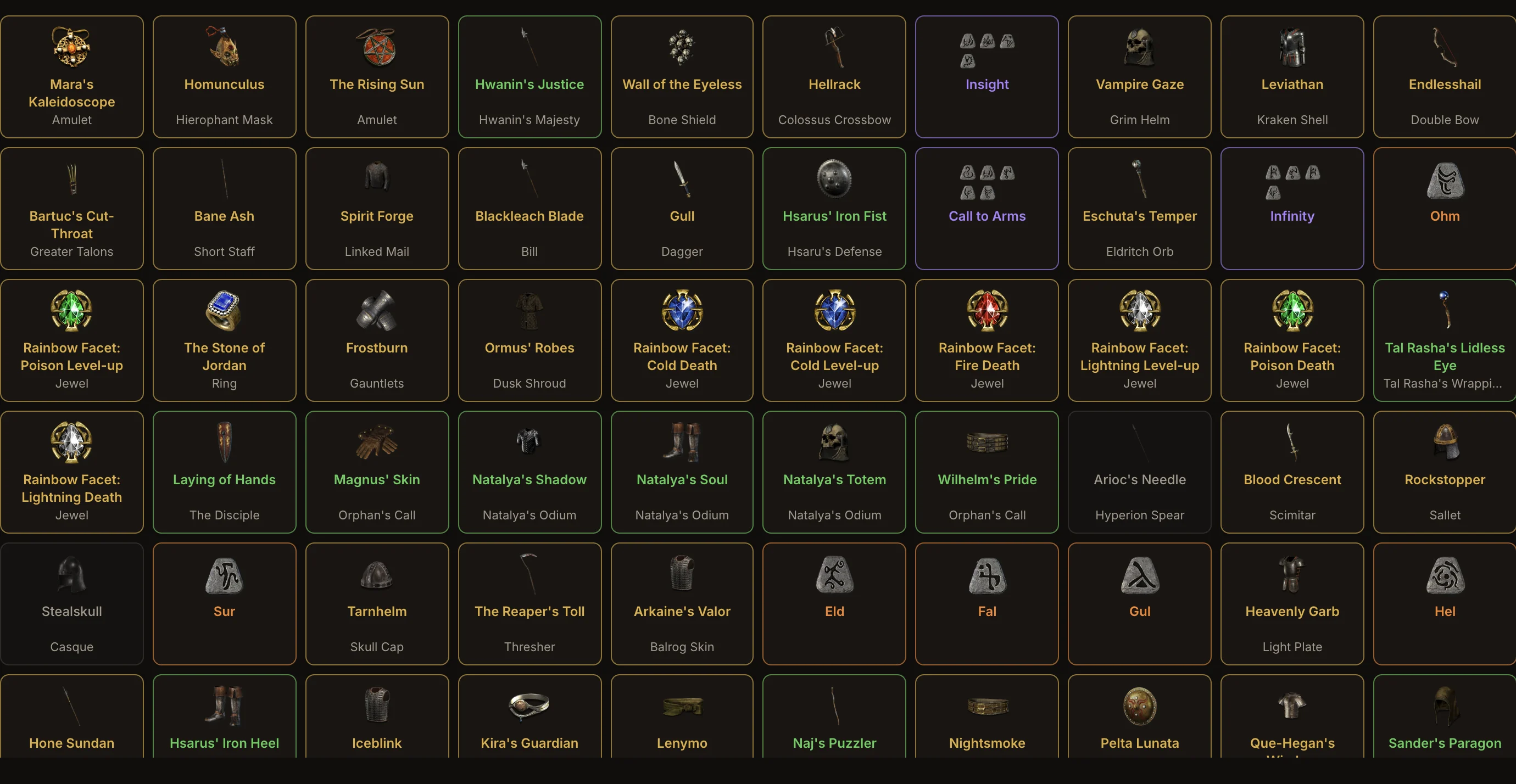
Holy Grail
Every unique, set item, rune and runeword in Diablo 2 Resurrected on one wall. Found items light up in their item color; missing ones stay dim.
- Detects finds from characters and shared stashes, including the v105+ stash
- Tracks normal and ethereal versions, for softcore, hardcore or both
- Search by name, base or set, filter by type and bookmark what you are hunting
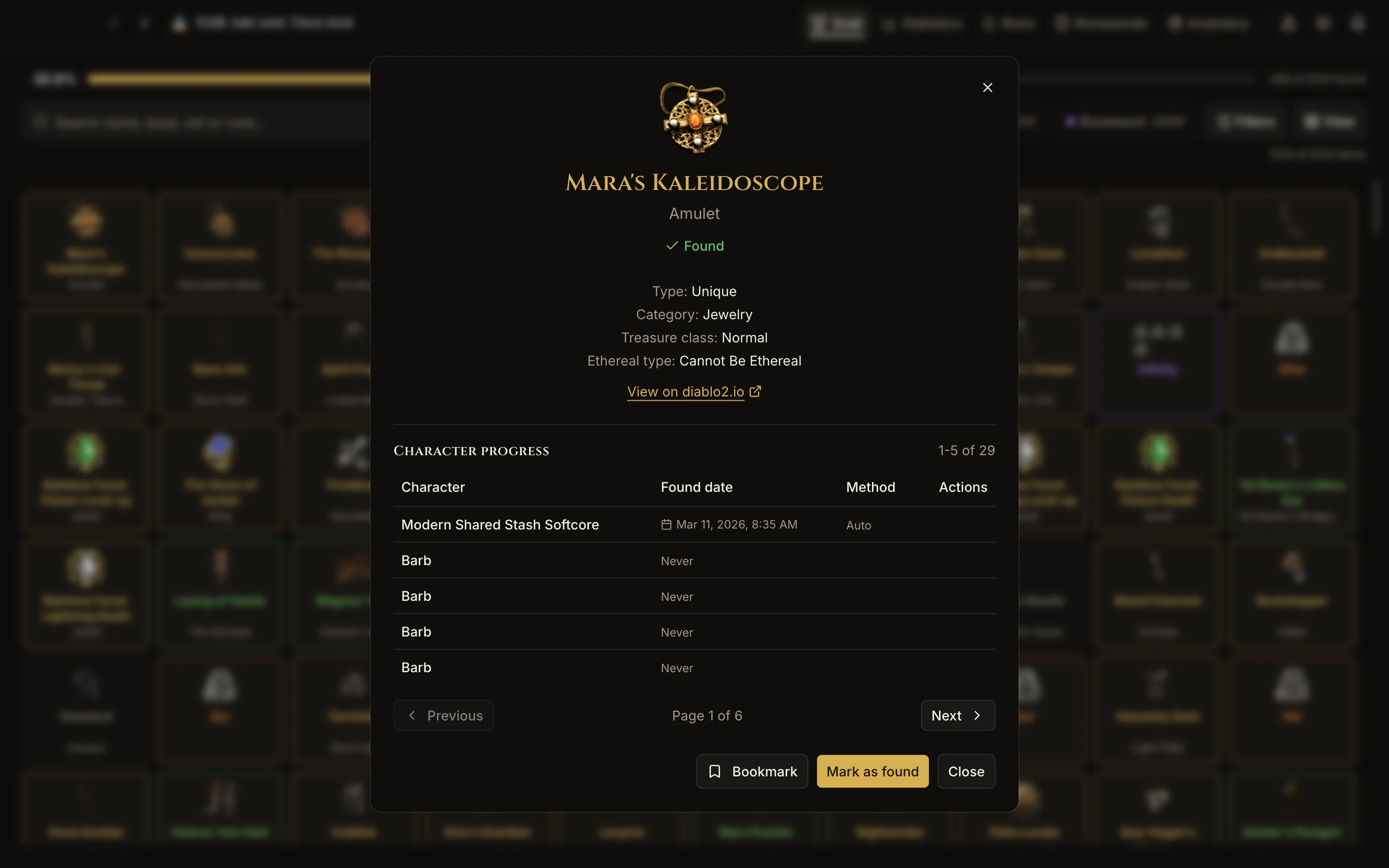
Statistics
See how far you are, what you found last, which set is closest to complete and which runes you still need.
- Grail progress over time and finds per week
- Progress by category and a comparison between characters
- Run statistics: session time, run durations and items per run
Run Tracker
Time your farming sessions run by run. Items you find are added to the run they dropped in.
- Auto mode starts and ends runs as you join and leave games
- Keyboard shortcuts and global hotkeys for manual runs
- Export sessions as CSV, JSON or text

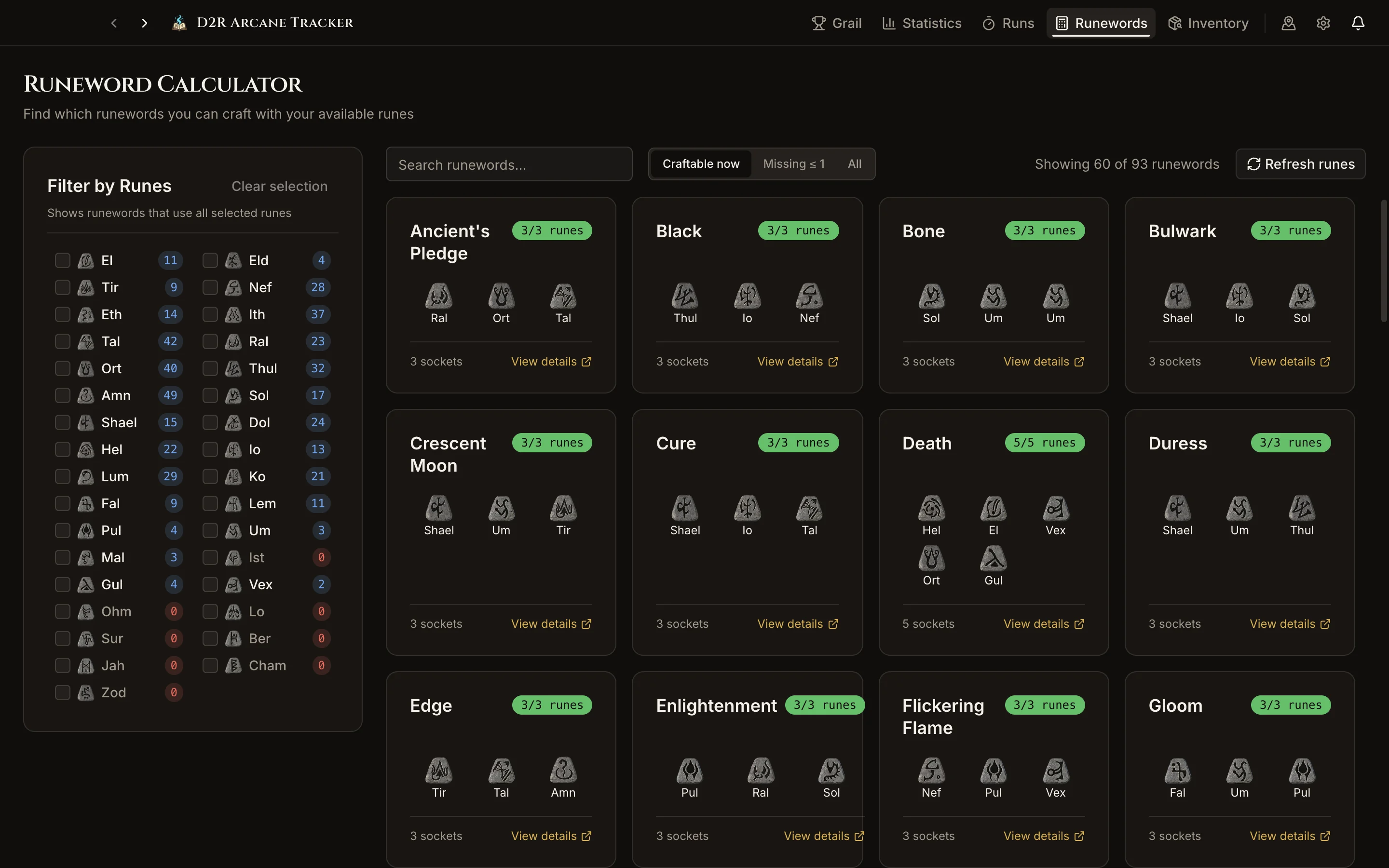
Runeword Calculator
Reads the runes in your save files and shows which runewords you can make right now.
- Craftable now, missing one rune, or every runeword
- Filter by the runes you want to use
- Shows how many of each rune you have
Inventory Browser
Look inside every character and shared stash without starting the game, and move items between them.
- Drag items between characters and stashes
- Keep items in the vault, outside your save files
- Backs up each save file before it changes it
Overlay, notifications and more
Overlay widget
An always-on-top window with your grail progress or the current run timer. Lock it and clicks pass through to the game.
Notifications
A sound, an in-app card or a Windows notification when you find a new item.
Terror zones
Choose which zones the terror zone rotation can pick.
Your data stays on your PC
Progress, runs and vaulted items are kept in a local database. Back it up and restore it from the settings.
Install D2R Arcane Tracker
Needs Windows 10 or later (64-bit) and Diablo II: Resurrected.
Download version 0.5.0Download the installer
Get
D2R-Arcane-Tracker-Windows-0.5.0-Setup.exefrom the latest release.Run it
The app isn't code-signed, so Windows may show "Windows protected your PC". Select More info, then Run anyway.
Choose your save folder
The setup wizard asks for it. It's usually
%USERPROFILE%\Saved Games\Diablo II Resurrected.Play
The game saves when you leave a game, so new finds show up once you are back in the menu.
FAQ
What the app reads and changes, where your saves are and what it runs on.
Is it safe to use? Can I get banned?
The app isn't affiliated with Blizzard, so it can't promise how Blizzard treats third-party tools. What it does: item tracking only reads your save files, and the app never writes to the game process. Two optional features edit game or save files: the Inventory Browser edits your save files and backs up each one first, and Terror Zone Configuration edits a game file and keeps a copy of the original.
Does it read game memory or only save files?
Item detection only reads save files: the
.d2scharacter files and the.d2ishared stash. The Run Tracker's auto mode (Windows only) also reads D2R's memory to tell whether you are in a game, so it can start and end runs for you. It never writes to the game. If you'd rather not use it, turn auto mode off and start and end runs with keyboard shortcuts.Does it work with the new v105+ shared stash?
Yes. Finds in a shared stash in the v105+
.d2iformat are detected like any other, and the stash is listed as Modern Shared Stash Softcore or Modern Shared Stash Hardcore. The Inventory Browser shows its tabs, including the Runes, Gems and Materials tabs with their stack counts.Is there a macOS or Linux version?
No. The app is only released for Windows 10 or later (64-bit). The tracker comparison lists other trackers, including ones that run on macOS and Linux.
Does it track hardcore characters?
Yes. In Settings → Tracking → Game Mode you choose whether softcore characters, hardcore characters or both count toward your grail. Switching doesn't delete any finds. Softcore and hardcore shared stashes are listed separately.
Where are my D2R save files?
Usually in
%USERPROFILE%\Saved Games\Diablo II Resurrected, the folder with your.d2scharacter files. The app uses that folder by default. If you pick its parent folder or one of its subfolders in the setup wizard, the wizard suggests the right one.Do I need mule characters?
No. Once an item is recorded you can sell, drop or use it. D2R only writes save files when you leave a game, so new finds show up once you are back in the menu.
Is it free and open source?
Yes. It's free, needs no account, and the source code is on GitHub under the MIT license. Your progress is kept in a local database on your PC.
How does it compare to other grail trackers?
It's a Windows desktop app that keeps watching your save folder, works offline and needs no account. It also has a run tracker and a terror zone editor. Other trackers support classic D2, more operating systems or an OBS feed. See the tracker comparison.
Holy Grail guides
How the grail tracker works, from your first grail to farming runs and terror zones.
Something not working? Search the issues or ask in Discussions.
- Holy Grail GuideThe challenge, setup, tracking options and how detection works
- Inventory BrowserMoving and vaulting items, and the safety rules
- Run Tracker GuideSessions, runs, auto mode, shortcuts and exports
- Terror Zone ConfigurationChanging which zones the game rotates through
- Extracting Game FilesNeeded for item icons and terror zones
- Holy Grail Tracker ComparisonHow this app compares to other grail trackers